
Part.3 FAQs

1. Installation, Compatibility, and Calibration:

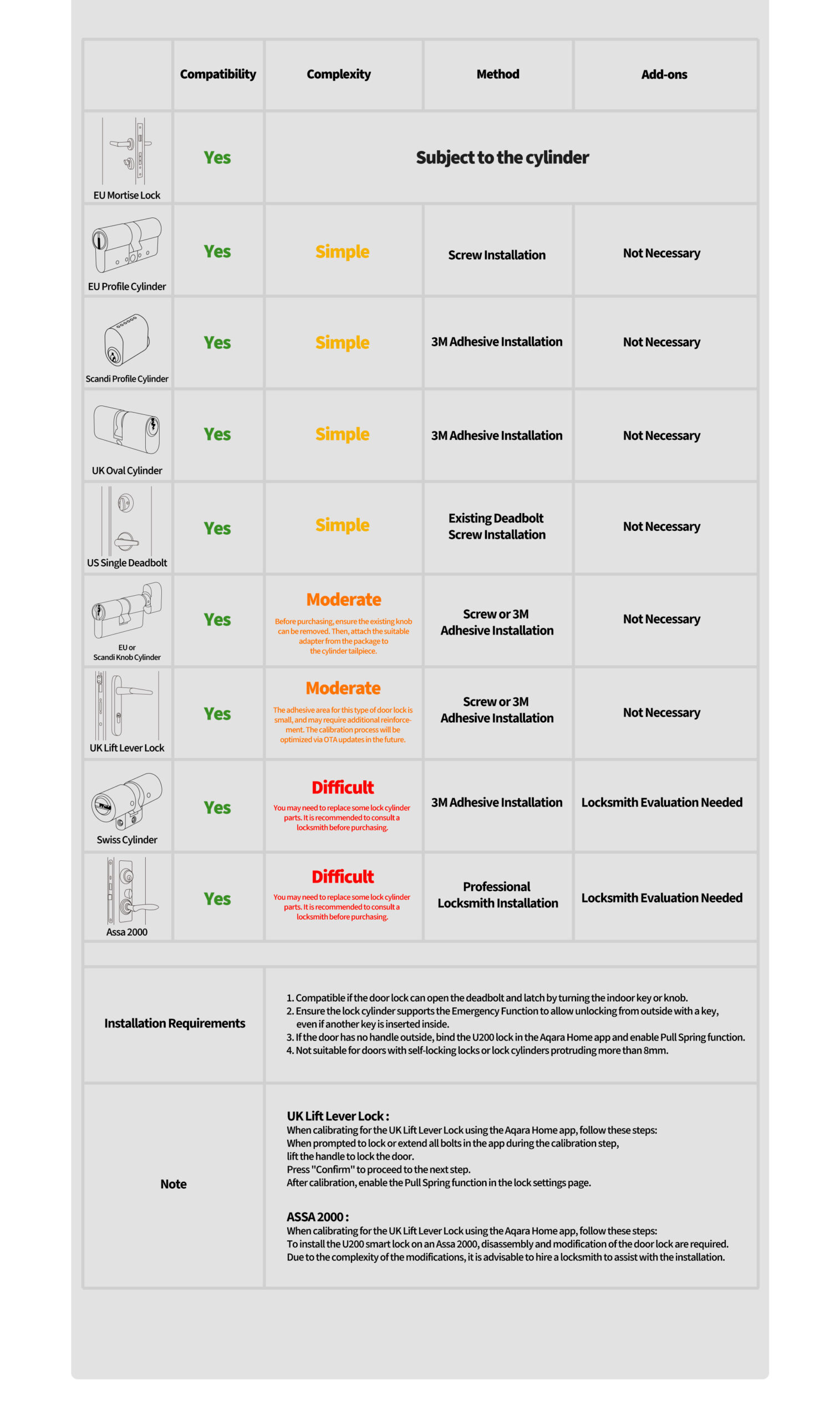
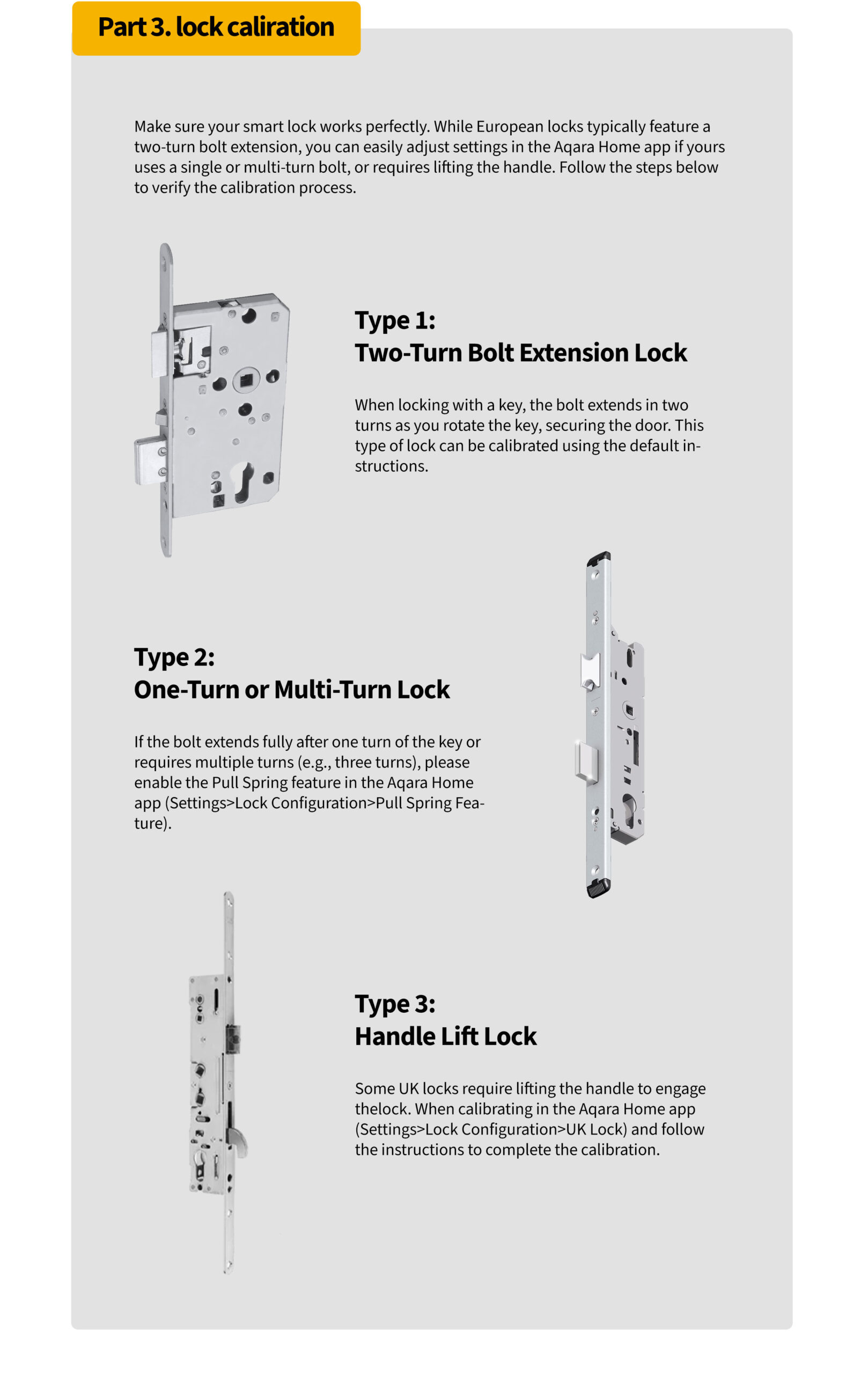
Yes, the U200 can pull the latch, making it suitable for doors with handles or those with only a keyhole. To use this function, enable the “Pull Spring Feature” in the settings of Aqara Home app.

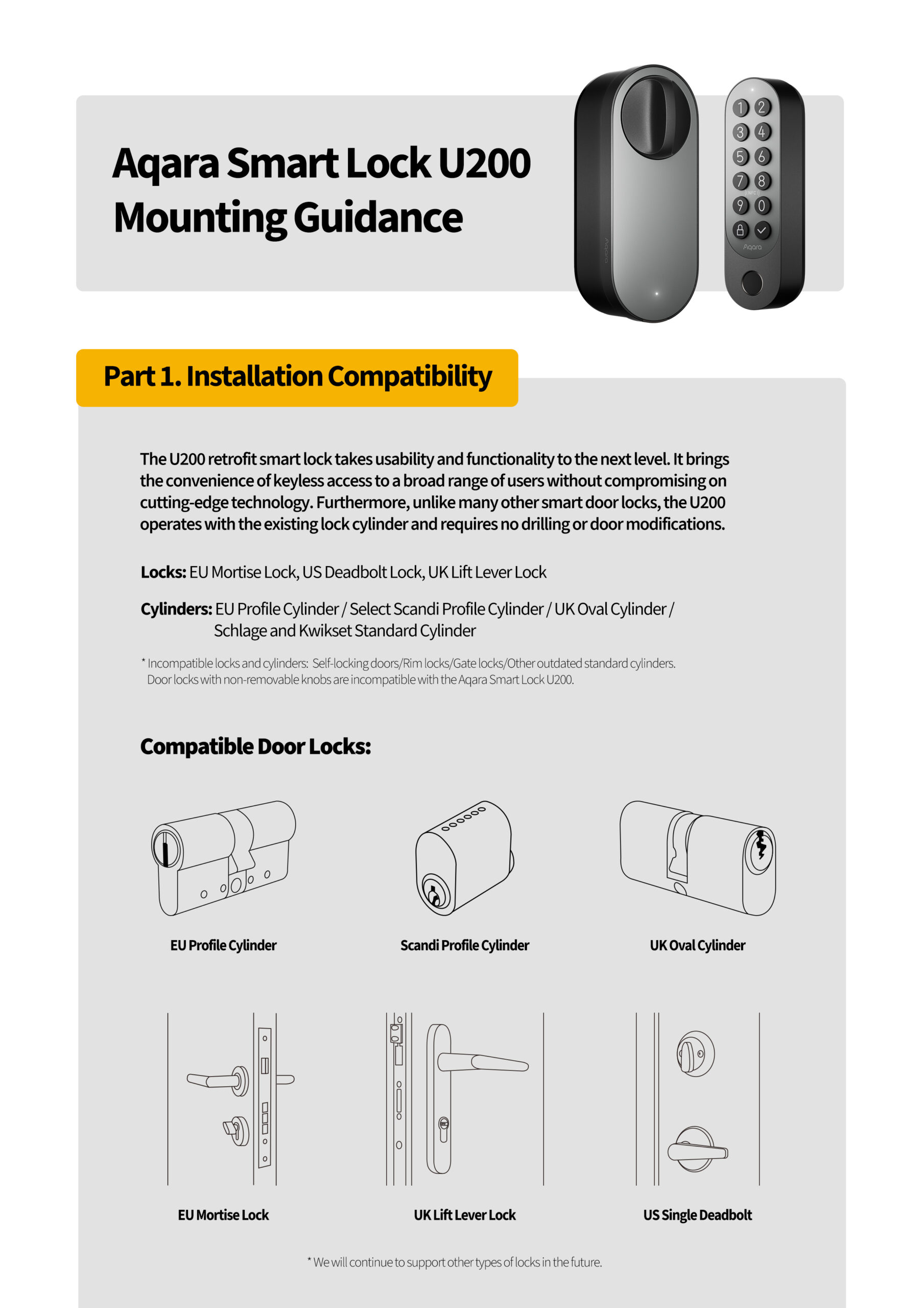
Compatible Locks: EU Mortise Lock, US Deadbolt Lock

A cylinder equipped with this feature enables it to be unlocked from the outside using a key, even if another key is already inserted on the inside. The U200 is specifically designed for compatibility with cylinders that offer this capability.

Self-locking locks/Rim locks/Gate locks/Other outdated standard cylinders

Yes, if your lock cylinder does not meet the installation requirements, consider the Aqara EU Profile Adjustable Cylinder, expected to launch in July 2024.

1) For Aqara Home Users:

Option 1: Go to “Settings” > “Calibrate Lock” in the app and choose either “Automatic Calibration” or “Manual Calibration.”

Option 2:  Long press (3s) the Set Button in the Door Lock for auto-calibration.

2) For Matter Users:

After installation, press and hold the “Set” button on the Lock for 3 seconds to initiate auto-calibration. 

2. Matter:

The U200 supports Matter over Thread, ensuring seamless interoperability across various smart home ecosystems.

1) Aqara Home Users: No hub is needed, but the Aqara M3 Hub is recommended for enhanced features like remote control and automations.
2) Matter Users: A Thread Border Router that supports Matter is required.

Binding to the Aqara M3 Hub allows for automations, remote lock/unlock, and more features in future updates.

Basic functions like locking and unlocking work with third-party ecosystems. However, we recommend using the Aqara Home app to access exclusive features and detailed settings such as Manual Calibration, Auto Lock, Auto-Turn Lock/Turn to Lock, Pull Spring Feature, and more.

1) Already bound: Enter pairing mode and follow the guidance to bind to another ecosystem.
2) Not bound: Reset the device and try again.

3. Apple Home:

Invite other Apple users to join the Family via the Apple Home app. Once joined, they will receive a door card automatically in their Wallet.

1) Standard Mode: Open Apple Wallet, select the door card, and tap iPhone/Watch close to the NFC area to unlock.
2) Shortcut Mode: Set up in Apple Home, then unlock with Face ID or password and move the device close to the NFC area.2) Matter Users: A Thread Border Router that supports Matter is required.

1) Please delete the home key from the Wallet app on your phone and then re-add it through the Home app. Alternatively, you can try logging out and back into iCloud before using the home key again.
2) If these steps do not resolve the issue, you may need to reset your door lock and set it up again in the Home app.

Currently, Apple does not support this function.

Follow these troubleshooting steps to resolve issues with the Aqara Smart Lock U200 and the Apple Home app:
1) Update Firmware: Ensure U200’s firmware is updated and follow the recommended reset and setup procedures.
2) Create a New Home: If you encounter errors like “Cannot add personal code” during the Passcodes step in the Apple Home app, create a new Home in the app.
3) Reset HomePod Mini: Reset a HomePod Mini and integrate it with the new Home to test the lock’s functionality. If successful, the issue may stem from the original Home configuration.
4) Migrate Home Setup: If problems persist, consider migrating to a new Home setup. Use the “Controller for HomeKit” app to back up and restore your HomeKit configuration, simplifying the process. Controller for HomeKit
5) Personal Code Length: Ensure the personal code for the lock is between 6-10 characters to ensure compatibility with the Home app.
6) Thread Border Router Alert: If you receive a ‘Thread Border Router Required’ alert, refer to Apple’s support link: https://support.apple.com/en-us/102078
7) Reset Door Lock: Refer to the electronic user manual for instructions on resetting the door lock.
8) Check iPhone Model Compatibility: Ensure your iPhone model supports Home Key by checking: https://support.apple.com/guide/iphone/unlock-your-door-with-a-home-key-iph0dc255875/ios
For further assistance or questions, don’t hesitate to reach out.

4. Lock Features:

A smartphone is required to connect the Smart Lock U200 to Aqara Home or other Matter ecosystems. After adding the admin and calibrating the lock, it can be used directly.

1) Aqara Home App Users: Yes, but remote control requires the Aqara M3 Hub.
2) Matter Users: A 2-in-1 Matter Controller and Thread Border Router is required.

1) Aqara Home App Users: You can set periodic or one-time passwords via Bluetooth. Remote temporary password settings will be available by H2 2024, requiring the Aqara M3 Hub.
2) Home App Users: You can set passwords remotely via the app.2) If these steps do not resolve the issue, you may need to reset your door lock and set it up again in the Home app.

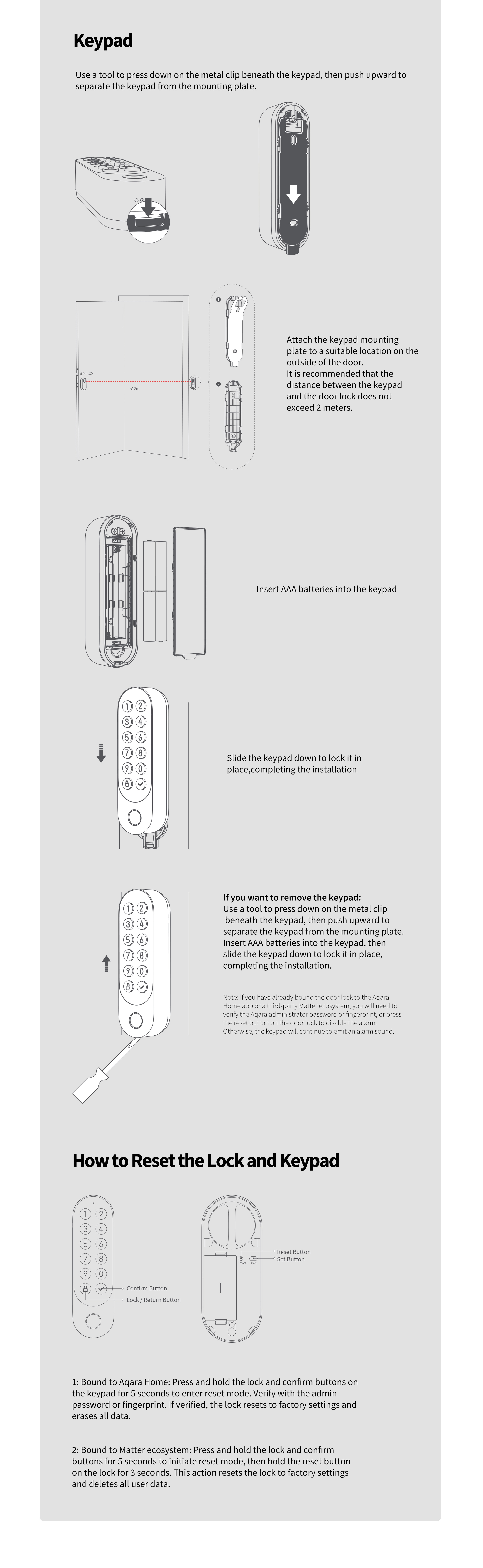
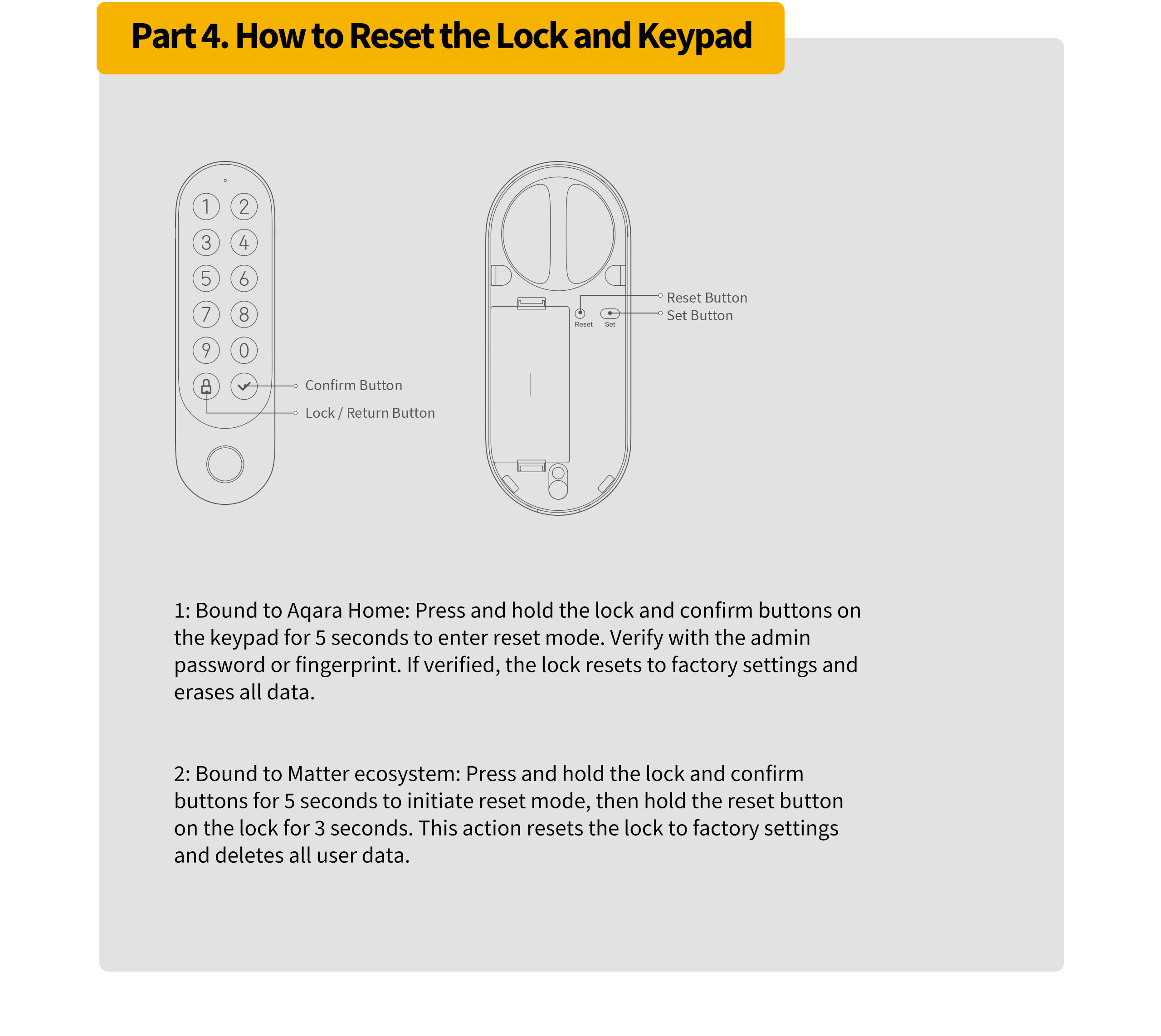
1) Aqara Home Users: Press and hold the Lock and Confirm buttons for 3 seconds. Verify the admin password or fingerprint. If correct, the lock will reset and clear all data.
2) Matter Users: 
First ensure your lock is only bound to one Matter ecosystem; Initiate Reset Mode on the keypad by pressing the Lock and Confirm buttons for 5s simultaneously; Press and hold the Reset button on the lock for 3s. 

Please contact our customer service for assistance.

The Smart Lock U200 will alert the user when the battery of the keypad or lock is below 20%, at which point the lock can still work normally for about two weeks.
1) Keypad: Use Bluetooth unlock with the Aqara Home app
2) Lock: Use the physical key

Re-register your fingerprint as it may change over time. For children and the elderly, update fingerprints regularly or register multiple fingers. Ensure fingers are dry and clean.

Up to 6 months with up to 8 daily lock/unlock actions via fingerprint or NFC. Battery life may vary based on usage and conditions.

Power the keypad with a 12V-24V AC/DC 0.5A supply. A compatible transformer should be installed by a professional electrician.

1) Local Settings: 
– Quiet Lock Mode: Long press (3s) Lock Button in the Keypad; or Single press the Confirm Button followed by single press Lock Button
– Quiet Unlock Mode: Single press the Confirm Button followed by password or fingerprint unlocking in the Keypad
2) Aqara Home Settings: Enable under “Settings” > “Quiet Unlock Mode.”

The U200 automatically locks after detecting door closure. Enable in the Aqara Home app under “Settings” > “Auto-Lock.”

This will be available through future OTA updates.

After 10 incorrect attempts, the lock will disable password input for 30 minutes. Use inside unlock or Bluetooth unlocking to release. Adjust the lockout duration in “Settings” > “Failed Attempt Lockout.”

Aqara Home Users: Update firmware via the settings page. Keep your phone close during the update (15-20 minutes). 
Matter Users: By the launch of the U200 lock, OTA updates via Apple Home are supported. 
Note that Aqara Home updates more frequently and earlier than Matter and other ecosystems. 

Aqara Home Users: Bind the lock to the Aqara Hub M3 for remote features.
Matter Users: Use a 2-in-1 Matter Controller and Thread Border Router.

Aqara Home Users: Open the door, press and hold the Confirm button for 3 seconds, then enter the admin password. Follow the prompts to add users.
Matter Ecosystem Users: Open the door, press and hold the Confirm button for 3 seconds, then press the Set Button. Follow the prompts to add users.Matter Users: By the launch of the U200 lock, OTA updates via Apple Home are supported. 
Note that Aqara Home updates more frequently and earlier than Matter and other ecosystems. 

No, it supports the Thread protocol, which is more stable and offers longer battery life.

Check if the lock is out of battery. If the issue persists after replacing the battery, contact customer service: support@aqara.com.

Aqara Home Users: Disarm by verifying the admin fingerprint or password.
Matter Users: Disarm by pressing the Reset button on the lock.

Scroll to Top

CERAGEM Project

Founded in 1998, CERAGEM is a global provider of comprehensive home healthcare solutions, guided by the philosophy that health management begins at home.


Aqara provides a diverse range of smart products, including sensors, smart lighting, and smart plugs. Leveraging the Aqara Developer Platform, these devices are deeply integrated with the CERAGEM Wellness System.


This collaboration not only enhances the commercial value of CERAGEM’s premium therapeutic equipment but also creates a more comfortable and convenient wellness environment for customers.

HAUS UPDATA Health Care

HAUS UPDATE is an innovative initiative that integrates IoT, AI, and lifestyle behavior data to create health-centric, modernized living environments in Japan.


Aqara contributed a comprehensive suite of smart home devices, including presence sensors, motion sensors, door and window sensors, vibration sensors, and bubs. 1,400+ Aqara devices were deployed in over 110 households.


In addition, Aqara provided API access via the Aqara Developer Platform and offered technical support to the project team, enabling capabilities such as device status monitoring, remote control, and account linking.

KAFD Apartment

The King Abdullah Financial District (KAFD) Apartment is a key milestone in Saudi Arabia’s urban development under Vision 2030.


Focused on high-end urban living, the project aims to deliver a modern and intelligent residential experience. Aqara provides a comprehensive array of smart home devices, including doorbells, door locks, smart lighting, and curtains. 10,000+ devices were deployed in over 500 apartments. All devices are seamlessly managed through the Aqara Home app, enabling a more convenient, comfortable, and connected living experience.

ADE Properties

ADE Properties is a premier Emirati-owned development company and part of the Al Dallal Group, a leading name in the UAE real estate sector.


Aqara partnered with ADE Properties to provide a complete smart home solution for 80+ apartments the ADE project. The solution enables energy-saving automation, intelligent lighting control, and smart curtain control throughout each apartment. Residents can also monitor and manage connected devices through a centralized tablet interface.

The project enhances convenience and provides a more connected living experience through integrated smart home technology.

Sobha Reserve

Sobha Reserve is a premium villa community developed by Sobha Group in Dubai, featuring Aqara’s whole-home smart solution.


The project incorporates Aqara Ssmart door locks, thermostats, smart switches, sensors, and smart curtains. Through the Aqara Home app, residents can manage lighting, air conditioning, and curtains throughout the home.


This solution enables energy-saving automations, remote control, and intelligent scene management, enhancing convenience and operational efficiency.

MBRHE Project

The Mohammed Bin Rashid Housing Establishment (MBRHE) is a large-scale housing and community development initiative led by the Dubai government.


Aqara partnered with e&, a leading technology and telecommunications provider in the UAE, to provide smart home solutions and services for 350 villas within the MBRHE project. Each villa is equipped with more than 15 types of smart devices, enabling intelligent lighting control, curtain automation, kitchen safety monitoring, and air conditioning control.


The project enhances residents’ quality of life through smart home technologies while supporting the development of modern and sustainable communities.

GK Zhelezno Project

GK Zhelezno is a federal-level real estate developer in Russia, founded in 2011. The company has delivered seven large-scale residential projects totaling over 2.6 million square meters, making it one of the country’s leading developers.


The project includes key Aqara devices such as sensors and smart switches, paired with Yandex speaker to enable Russian-language voice control. Built on Zigbee wireless technology, the system supports both local and remote control and continues to operate even without an internet connection, making it well suited to residential environments and varying network conditions.

Episode Yongsan 241 Hotel

Episode Yongsan 241 is a modern co-living and rental complex located near Yongsan Station in Seoul. It offers flexible, premium living spaces for individuals and small families seeking short or long-term stays without the commitment of homeownership.


The project uses a wide range of Aqara smart devices, including hubs, door locks, smart plugs, temperature and humidity sensors, motion sensors, and presence sensors. These devices support a range of smart functions, such as fingerprint-based door access, environmental monitoring, automatic heating control based on temperature and humidity levels, and sleep status detection.


In addition, the project is integrated with the property management system through Aqara APIs, enabling real-time device monitoring and remote operation.

Sfeel Smart Farm Café

Sfeel is one of the leading investors in South Korea’s smart farming industry, operating under its independent smart farm brand “Sun In Farm”.


By integrating 200+ smart devices for each location, including the Aqara Presence Sensors and Controllers, the project enables automated water supply, lighting control, and dimming adjustment. The solution streamlines daily operations and enhances overall farm management efficiency.

East Lancashire Cricket & Sports Club

This club is one of the oldest cricket clubs in Northern England. As its operations expanded and the number of annual events increased, the club faced several operational challenges, including fragmented equipment management across different areas, high energy consumption, limited security monitoring coverage, and inefficient remote maintenance.


To address these challenges, Aqara deployed 300+ smart devices, including cameras, hubs, sensors, and controllers to build an complete smart system. The solution provides full-area monitoring, intelligent control, optimized HVAC management, and remote operation & maintenance capabilities. The deployment significantly improved operational efficiency and provided a more comfortable environment for venue users.


This project showcases Aqara’s expertise in commercial smart space solutions and highlights how intelligent technologies can accelerate the digital transformation of traditional sports venues.

Aqara Zigbee-Geräte können zu Aqara Home hinzugefügt werden, da S1 Plus bereits ein Aqara Zigbee Hub ist. Das Hinzufügen von Matter-Zubehör (wie Matter über Thread) erfordert einen Matter-Controller wie den Hub M3, der zuerst in Aqara Home eingerichtet werden muss; danach können sie auf dem Bildschirm konfiguriert werden.
Aqara Zigbee-Gerätetyp
Matter-Gerätetyp
Licht
Dimmbare Plug-in-Einheit
Steckdose
Montierte Ein/Aus-Steuerung
Schalter
Montierte dimmbare Laststeuerung
Klimaanlage
Raumklimaanlage
Fensterabdeckung
Fensterabdeckung
Kamera
Luftqualitätssensor
Thermostat
Thermostat
IR-Gerät
Ein/Aus-Plug-in-Einheit
Türschloss
Türschloss
Temperatursensor
Ein/Aus-Licht
Luftfeuchtigkeitssensor
Dimmbare Lampe
TVOC-Sensor
Licht mit Farbtemperatur
Button
Erweiterte Farblichter
Fußbodenheizung
Aqara Zigbee devices can be added to Aqara Home as S1 Plus is already an Aqara Zigbee Hub. Adding of Matter accessories ( such as Matter over Thread ) need a Matter controller like Hub M3 that's set up in Aqara Home first; afterthat, they can be configured on screen.
Aqara Zigbee Device Type
Matter Device Type
Light
Dimmable Plug-In Unit
Outlet
Mounted On/Off Control
Switch
Mounted Dimmable Load Control
Air Conditioner
Room Air Conditioner
Window Covering
Window Covering
Camera
Air Quality Sensor
Thermostat
Thermostat
IR Device
On/Off Plug-in Unit
Door Lock
Door Lock
Temperature Sensor
On/Off Light
Humidity Sensor
Dimmable Light
TVOC Sensor
Color Temperature Light
Button
Extended Color Light
Floor Heating

Please select your country/regions

사용자위치를선택하세요.

Bitte wählen Sie Ihr Land/Ihre Regionen aus

North America

Select another country or region to get content and online shopping options that apply to your location

사용자위치를선택하세요.

Wählen Sie ein anderes Land oder eine andere Region aus, um Inhalte und Online-Einkaufsoptionen zu erhalten, die für Ihren Standort gelten

Purchase Aqara’s Latest Smart Products. Shop Now»